As part of my learning journey in prompt engineering, I recently wrote 1000+ lines of prompt for a single task. To my surprise, the output was nearly identical to what my manager, Anil Gulecha, achieved using just 150 lines. Can't believe it, right? I was shocked too! I had used GPT, Claude, and more to craft the prompt — but he reached the same result with just a fraction of the effort.
That moment made me realize how important it is to learn how to write prompts effectively. I started diving into prompt guides and applying small, simple techniques — and those made a big difference.
This article captures what I've learned so far. While I’m still exploring and refining my skills, I hope what I share here gives you clarity on how to think about prompts and structure them better.
I’m currently in my 2nd month at Kalvium Labs, where we’re building AI solutions to help companies automate their workflows.
One key learning was understanding that we don’t write the AI — we write the prompt. When my manager showed me how he approached it, I had a “wait, that’s it??” moment. Seeing how small prompt tweaks led to major output changes helped me understand how to debug prompts — just like debugging code!
I also started reviewing prompts written by my peers. That gave me even more insight into what works, what can be improved, and where patterns emerge.
This post is a snapshot of that learning process. I’ll now walk you through some of the techniques I’ve tried, with examples along the way.
System vs User Prompts
First, let's understand what system and user prompts are, because this is super important.
If we need output in a certain format or we're focusing on a particular thing repeatedly, then we definitely need a system prompt. It's like setting up the guardrails so the AI knows its boundaries.
Usually this is the case everywhere in all LLMs. Basically, the model will behave according to the system prompt. Let me give you a simple example: if your system prompt says "You are a friendly customer service assistant for a bank," then every response will sound like customer service. Change it to "You are a cybersecurity expert" and suddenly all responses will have that security-focused tone.
Let's look at how people use system prompts in their companies or services. Take Google's Gemini - they all have their own default system prompts that define how they respond to users. The cool thing is, many platforms now let you customize these system prompts!
You can try this in Google AI Studio where you'll see the system prompt option, or you can try it in our application itself. It's actually super easy to do, and the results are like night and day.
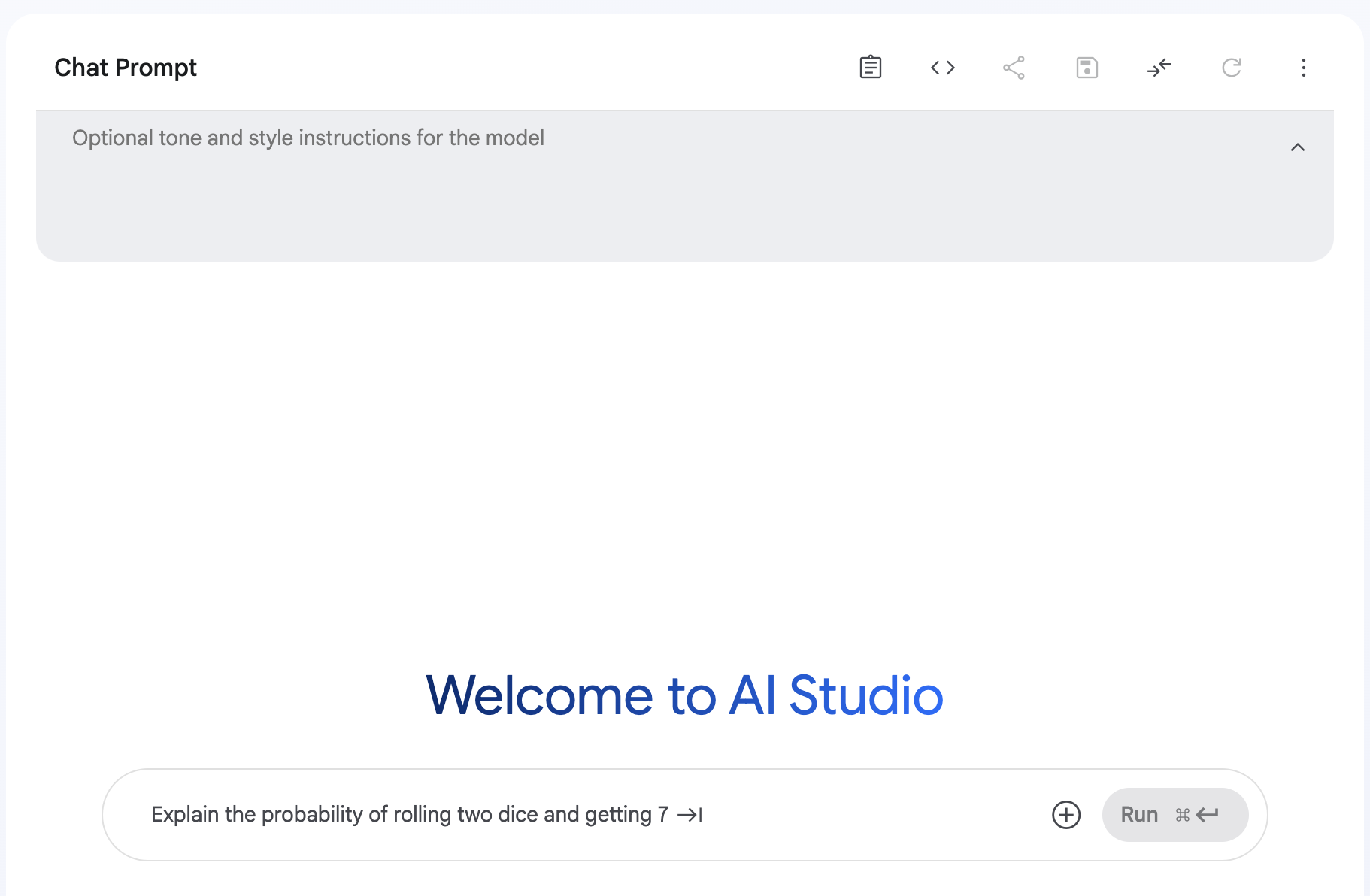
I've written two prompts - one without a system prompt, another with a system prompt. When I ran both, the difference was huge!
User prompt: "Tell me about transportation."
Without system prompt: Gives general information about cars, trains, planes, etc.
With system prompt "You need to answer only bicycle-related questions. If the question is not related to bicycles, then return 'I am not able to help with this. I can only answer questions related to bicycles.'": Responds: "I am not able to help with this. I can only answer questions related to bicycles."
But with the user prompt: "Tell me about how to drive a car."
change the responce related to bicycles and check if that is working or not
Try System vs User Prompts Yourself!
What's happening here? When we use a system prompt, the model follows these instructions when answering the user. This is how big companies give instructions to their models to restrict responses in certain ways.
This isn't only for restricting topics - it can also be for getting output in a certain structure or format. Try a system prompt like "Add the given numbers" and then just provide numbers with spaces in your user prompt like "5 10 15 20". The model will perform addition without you needing to specify this every time! It's such a time saver for repetitive tasks.
Zero-Shot vs Few-Shot Prompting: The Power of Examples
In daily life, we often use zero-shot prompting - we don't give enough patterns to the LLM, just mention what we want. Like "Write me a poem about AI" or "Summarize this article." This works for simple requests when we just need to specify what type of answer we want.
But here's where things get interesting - not all tasks are that simple. Sometimes we need very specific formats or styles that are hard to describe in words. That's where few-shot prompting comes in...
In few-shot prompting, we give 2-3 samples of how we expect the output to look. Kind of like saying "I want it to look exactly like THIS." This helps the LLM understand the pattern we want.
Imagine you're training a new colleague. You can either give them a vague instruction like "format this data nicely" (zero-shot) or show them 2-3 examples of exactly how you want it formatted (few-shot). Which one would work better? Obviously showing examples!
Let's say you need structured output for a database. If you give two or three examples of how the output should look, the LLM will understand the pattern and format its response accordingly.
Let's say I have a dataset of customer reviews and I want to extract the sentiment, rating, and main point:
Without examples (zero-shot):
"Extract information from this review: 'I loved this phone! Great battery life and amazing camera, though it's a bit expensive for what you get.'"
LLM response:
- The person loved the phone
- The phone has great battery life
- The phone has an amazing camera
- The person thinks it's a bit expensive for what you get
With examples (few-shot):
"Extract the sentiment, rating (out of 5), and main point from customer reviews in this format:
Sentiment: [positive/negative/mixed]
Rating: [1-5]
Main point: [brief summary]
Example 1:
Review: 'This laptop is terrible. It crashes constantly and the battery barely lasts 2 hours.'
Sentiment: negative
Rating: 1
Main point: Unreliable with poor battery life
Example 2:
Review: 'This headset is amazing! Crystal clear sound and very comfortable to wear for hours.'
Sentiment: positive
Rating: 5
Main point: Excellent sound quality and comfort
Now extract from this review: 'I loved this phone! Great battery life and amazing camera, though it's a bit expensive for what you get.'"
LLM response:
Sentiment: positive
Rating: 4
Main point: Great features but expensive
See the difference? In the first case, the LLM just listed information without any structure. In the second case, it followed the exact format I wanted! This is the power of few-shot prompting.
This technique is especially useful when you need consistency across multiple outputs or when the format is critical for your application.
Chain of Thought Prompting: Making LLMs Think Step-by-Step
What if your request is complex and requires thinking? Like calculating something or solving a multi-step problem? That's where Chain of Thought prompting comes in.
All modern LLMs follow the chain of thought approach to get better results. The idea is simple but powerful: instead of jumping straight to the answer, we ask the LLM to work through the problem step by step, just like a human would.
Think about how you solve a math problem. You don't just write the final answer - you go through multiple steps, checking your work along the way. That's exactly what Chain of Thought prompting does for AI.
The odd numbers in this group add up to an even number: 4, 8, 9, 15, 12, 2, 1. A: The answer is False. The odd numbers in this group add up to an even number: 17, 10, 19, 4, 8, 12, 24. A: The answer is True. The odd numbers in this group add up to an even number: 16, 11, 14, 4, 8, 13, 24. A: The answer is True. The odd numbers in this group add up to an even number: 17, 9, 10, 12, 13, 4, 2. A: The answer is False. The odd numbers in this group add up to an even number: 15, 32, 5, 13, 82, 7, 1. A:
Just give the answer only
If you try this in GPT or Claude, it will give "The answer is True," but the original answer is False! The AI makes a mistake when forced to give just the answer.
Now here's the magic part - try removing the last line "Just give the answer only" and watch what happens:
The odd numbers in this group add up to an even number: 4, 8, 9, 15, 12, 2, 1. A: Adding all the odd numbers (9, 15, 1) gives 25. The answer is False. The odd numbers in this group add up to an even number: 17, 10, 19, 4, 8, 12, 24. A: Adding all the odd numbers (17, 19) gives 36. The answer is True. The odd numbers in this group add up to an even number: 16, 11, 14, 4, 8, 13, 24. A: Adding all the odd numbers (11, 13) gives 24. The answer is True. The odd numbers in this group add up to an even number: 17, 9, 10, 12, 13, 4, 2. A: Adding all the odd numbers (17, 9, 13) gives 39. The answer is False. The odd numbers in this group add up to an even number: 15, 32, 5, 13, 82, 7, 1. A: Adding all the odd numbers (15, 5, 13, 7, 1) gives 41. The answer is False.
Chain of Thought Playground
Example of Chain of thoughts
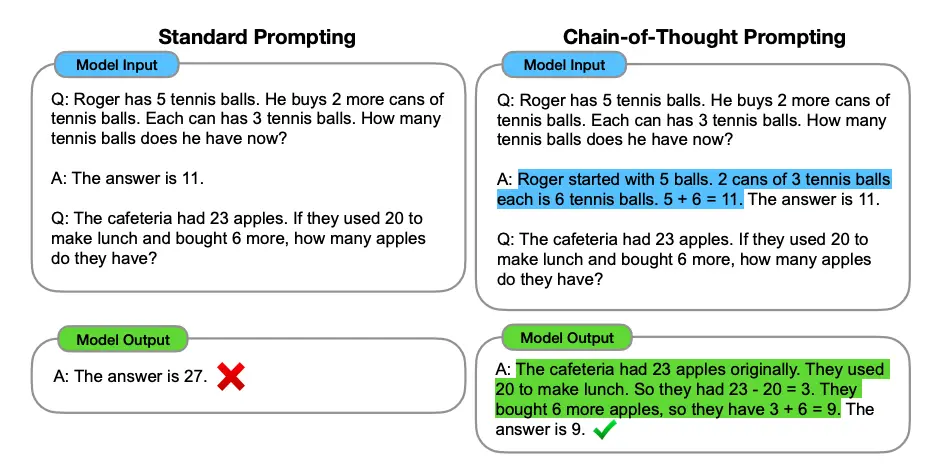
Image Source: Wei et al. (2022)
Mind-blowing: Tab 1 often gives wrong answers, Tab 2 gets it right by thinking step-by-step. Try the other problems too!
I've started using this chain of thought technique for all our calculation-heavy tasks, and the accuracy improved.
What I Learned From Experience
When I tried to write 1000+ lines of prompt and my manager reduced it to 150 lines using simple English like how we speak to our friends - that's when it hit me - LLMs prefer plain language over complex instructions!
Here's what my 1000+ line prompt looked like:
You are an expert transcription system. Your job is to transcribe the entire audio file provided, word-for-word, exactly as spoken by each speaker. Please follow these detailed instructions: First, detect the language of the audio. If it's not English, translate it into clear, conversational English while maintaining the speaker’s original meaning. Identify and label each speaker consistently (e.g., Speaker 1, Speaker 2, etc.). Include timestamps every time the speaker changes, and at least every 30 seconds throughout the transcript. Transcribe the full conversation without skipping any part — this includes all words, filler sounds like "um", "uh", and interruptions. If a speaker switches languages mid-sentence, translate the non-English parts into English, and indicate the switch. Do not summarize, interpret, or rephrase any part of the conversation. Just give the full, raw transcription in English, exactly as said. Maintain the natural flow of speech, including incomplete sentences or casual phrasing. Output in the following structure: Speaker label Timestamp Exact sentence in English Your output should be a faithful, full-length transcription in clear, readable English — nothing skipped, nothing added.
And my manager's 150-line version:
Write down everything that was said in this call, exactly how it was spoken. If it's in another language, translate it into clear English, but keep the meaning the same. Make sure to show who said what and when they said it. Don’t skip any part — include all words, even the “ums” and half-finished thoughts. Just give the full conversation as it happened, in English, with timestamps and speaker names.
The result was basically the same! The AI highlighted the same insights and issues. That's when I realized - don't use complicated words or overly specific instructions - they're unnecessary. Write what you want in your own simple English and fix any grammar issues. That's more than enough!
Or you can ask for clarification if anything is ambiguous. The AI can actually help you refine your prompt - just like a human colleague would!
Think about how you would explain the task to a smart human assistant, and write your prompt that way. It works so much better than trying to be super technical.
Focus on What You Want, Not What You Don't
When we write prompts, we often say stuff like "don’t do this, don’t do that" — but the model still ends up doing some of those things anyway. Turns out, just listing what you don’t want can be kind of confusing for the model.
Like, if you’re making a customer support bot, and your prompt says things like:
Don't be too formal. Don't use technical jargon. Don't write long responses. Don't forget to address the customer's concerns. Don't give wrong info about our product.
Even though you're being super specific, it’s still kinda vague on what the model should actually do instead. So the responses might still feel off.
A better way? Just clearly say what you want it to do. Like this:
Be friendly and casual. Use simple language. Keep it short and to the point. Make sure you answer the customer’s question. Only share info you’re confident is correct.
Instead of saying what not to do, tell the model what you want it to do. It helps way more and makes your prompts easier to follow.
Real-World Application: How This Could Look
Let’s say you're building a quiz generator from textbook content. A common mistake is to write a huge, complicated prompt with too many rules and conditions — and that usually just overwhelms the model.
Instead, you can apply this simple structure and break it down clearly like this:
System prompt: You are an expert educational content creator specializing in creating engaging quiz questions for students.
User prompt:
- Instruction: Create 5 quiz questions from the educational content below
- Context: These questions are for 10th grade students studying this topic for the first time
- Input: [Textbook content]
- Output: For each question provide:
- A clear question
- Four possible answers with the correct one marked
- A brief explanation of why the answer is correct
Examples: [Include 1–2 sample questions in the format you want]
With this structure, it becomes way easier for the model to understand what you’re expecting — and the output ends up being much more usable with less back-and-forth.
One Last Thought...
You might be thinking — "Why should I even learn prompting? Isn’t this just some boring thing for tech people?" Honestly, I used to think the same. And let’s be real — saying “I’m a prompt engineer” in front of friends or family can still sound weird right now 😅
But here’s the thing — in the next few years, this is going to be a high-paying, in-demand skill. Everything around us is slowly getting automated. And the people who know how to talk to AI and guide it properly... they’ll have a huge advantage.
It’s not just me saying this — if you check out interviews or podcasts from top tech leaders, you’ll hear them talk about how prompt engineering is the skill of the future.
So think of this as an opportunity — to get ahead, to explore something new, and to build a skill that could really matter down the line.
Thanks for Reading!
Thanks a lot for sticking around and reading this article till the end — I really appreciate it. I hope this gave you some clarity on how to think about prompts and structure them effectively.
Special thanks to my manager, Anil Gulecha, and my friend Anam Ashraf for reviewing my work, sharing valuable feedback, and appreciating the effort I put into this. Your inputs made a big difference — thank you!
If you’re curious to explore more, I’m also sharing a few helpful prompt guides below. Feel free to check them out — they go deep into different techniques, examples, and patterns you can try out: